Everyone says to use strong grip mats for cardstock (regular grip works better and here's why)
Strong grip mats for cardstock? That's what Cricut recommends, but I've ruined fewer sheets and spent less time peeling since I switched to regular grip.
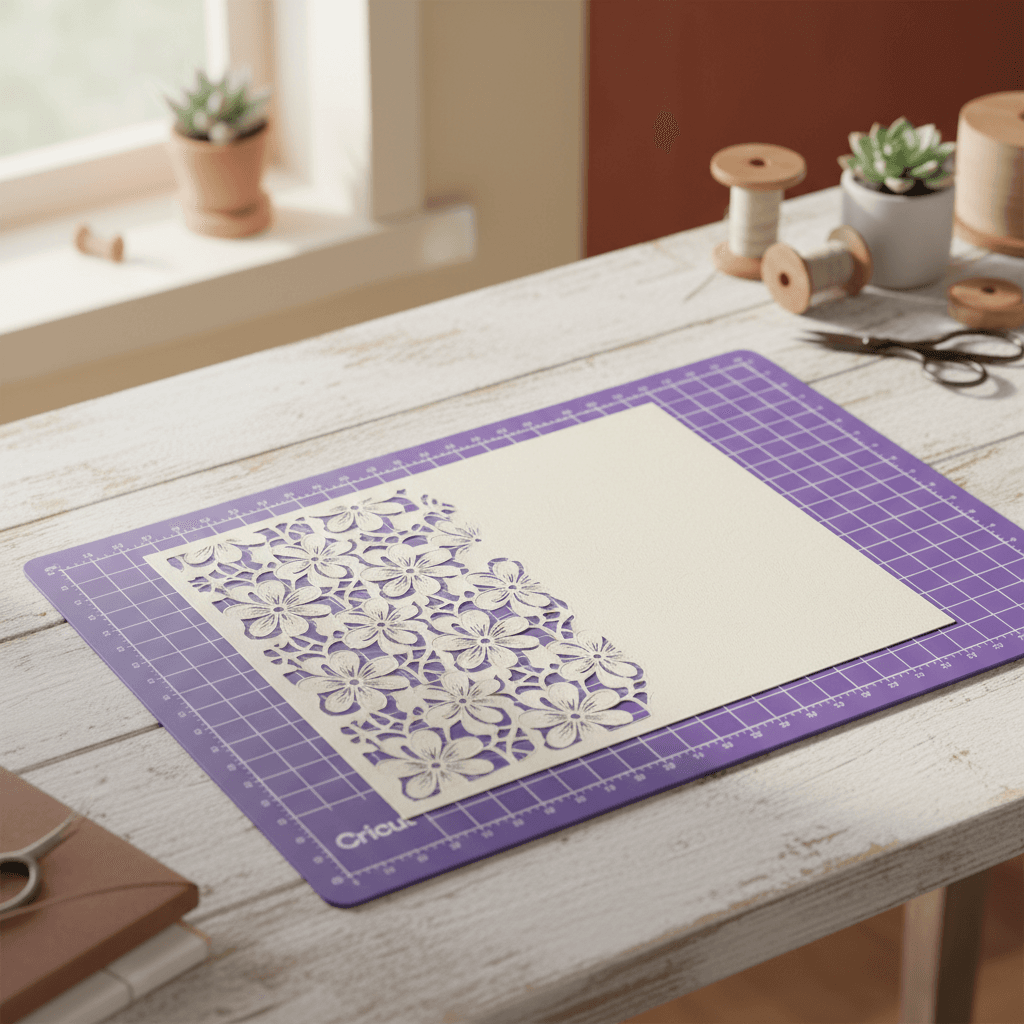
I spent my first six months with a Cricut Maker ruining the edges of cardstock because I followed the official mat guide. Strong grip for cardstock, it says. Medium chipboard and up. Except my 65lb cardstock kept curling at the corners, the blade dragged through delicate cuts, and I'd spend ten minutes peeling each sheet off without tearing it. Then I grabbed the wrong mat one morning, the regular grip one I use for vinyl, and everything just worked.
Why strong grip mats actually fight cardstock (not help it)
The logic sounds right. Cardstock is thicker and heavier than paper, so it needs more grip to stay put during cutting. Cricut's own materials guide says strong grip. Every YouTube tutorial I watched in 2023 said strong grip. But here's what nobody mentions: cardstock doesn't move much during cutting anyway. It's rigid. The blade goes through it in one pass, there's no drag or shift like you get with fabric or thin vinyl that might peel up mid-cut.
What strong grip actually does is clamp down so hard that the cardstock fibers compress into the adhesive. When you peel it off, you're not just releasing the sheet, you're ripping the top layer of paper away from itself. That's why the back of your cuts look fuzzy or why corners lift with little white fibers stuck to the mat. It's also why intricate cuts, anything with points or narrow bridges, tear when you try to remove them.
What actually happens when you use regular grip instead
I switched to regular grip mats for all my 65lb and 80lb cardstock cuts about a year ago. The cardstock still doesn't move. I've never had a sheet shift or a corner peel up during a cut. But now when I'm done, the sheet just lifts off. No yanking, no babying the corners, no torn edges on detailed cuts. The back of the cardstock is smooth, not pilled.
Regular grip has just enough tack to hold the sheet flat without bonding to it. Think of it like painter's tape versus duct tape. Both stick, but one of them lets go when you're done without taking the paint with it. For cardstock under 100lb, regular grip is painter's tape. Strong grip is duct tape, and you don't need duct tape for something that isn't trying to escape.
- 65lb cardstock: regular grip, every time. This is your standard Michaels or Hobby Lobby weight.
- 80lb cardstock: still regular grip. I've cut wedding invitations on 80lb linen cardstock with regular grip and zero issues.
- 100lb+ or actual chipboard: okay, now you might need strong grip, but test regular first. I've had 110lb covers cut fine on regular.
The step-by-step I actually use now (Cricut Maker or Maker 3)
- Load your cardstock onto a regular grip mat (purple or blue, depending on which Cricut generation you have). Press it down flat with your hand, but don't burnish it like you're trying to laminate the thing. Just smooth it.
- Set your material in Design Space to 'Cardstock, 80 lb' or whatever weight you're actually using. Let it pick the default blade and pressure. For most cardstock, that's the fine-point blade on 'Medium' or 'Default' pressure.
- Cut. Don't touch the mat, don't hover, just let it run.
- When it's done, pull the mat out and flip it over. Peel the mat away from the cardstock, not the cardstock away from the mat. This is the same technique you'd use for vinyl, and it works even better for cardstock because the sheet is stiff enough to stay flat as you peel the mat back.
- If you have small interior cuts (like the inside of a letter 'O'), poke those out from the back with a weeding tool. They'll pop right out. On strong grip, they'd still be half-stuck.
When regular grip doesn't work (and what to do instead)
There are two situations where I'll reach for strong grip. One: I'm cutting actual chipboard, the 2mm stuff that's basically thin wood. That needs the clamp. Two: I'm cutting something with a ton of tiny separate pieces, like confetti dots, where the pieces might shift as the blade moves between cuts. For standard cardstock projects, invitations, cards, gift tags, party decor, I haven't touched a strong grip mat in months.
If regular grip isn't holding your cardstock and you're getting shifts, the problem isn't the mat. It's either that your cardstock is too thin (in which case it's not actually cardstock, it's text-weight paper and you should set it to that in Design Space), or your mat is old and has lost its tack. A regular grip mat that's been washed and refreshed with repositionable adhesive spray will hold 80lb cardstock just fine. A year-old strong grip mat covered in paper dust won't hold anything.
Why this matters if you're cutting anything detailed
The real test is intricate cuts. I cut a lot of wedding invitation liners with lace patterns, lots of negative space and narrow bridges between the design elements. On strong grip, I'd lose at least one out of every five sheets because a delicate section would tear when I peeled the mat away. The adhesive would grab a thin bridge of paper and rip it before I could stop. On regular grip, I can peel the whole sheet off in one smooth pull and everything stays intact.
Same thing with layered card fronts. If you're cutting a design that has pieces you'll pop out and layer, strong grip turns removal into surgery. You're sitting there with a spatula trying to coax each piece off without bending it. Regular grip, you peel the mat, flip the sheet over, and push the pieces out from behind. Done in thirty seconds.
I'm not saying Cricut's material guide is useless. For fabric, for shimmer vinyl, for anything that actually moves during cutting, it's dead-on. But for cardstock, the conventional wisdom is backwards. Regular grip gives you cleaner cuts, faster removal, and fewer ruined sheets. Try it on your next project. If the cardstock shifts, you can always stick it on a strong grip mat and re-cut. But I'd bet money it won't shift, and you'll wonder why you ever fought with strong grip in the first place.